
Integrations
Your contacts, in the CRM you already use.
mTap captures and enriches the people you meet, then syncs them to your CRM in real time — no CSV exports, no re-keying.
mTap is not a CRM. It's the in-person front-end that feeds the one you've got.
Inside the app
Connect your CRM from the app.
Pick the profile, choose your CRM, and every contact you capture flows straight into it.
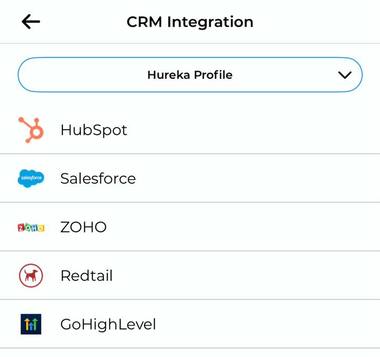
Screens from the mTap app. Details shown are examples.
Six CRMs. One in-person front-end.
- Salesforce
Mid-market and enterprise sales teams running pipeline in Salesforce.
See Salesforce sync → - HubSpot
Marketing and sales teams running lifecycle in HubSpot.
See HubSpot sync → - Keap
Small businesses, coaches, and solopreneurs running automation in Keap.
See Keap sync → - Zoho
SMB sales teams running pipeline in Zoho CRM.
See Zoho sync → - Redtail
Financial advisors running client data in Redtail CRM.
See Redtail sync → - GoHighLevel
Agencies and GHL sub-accounts running client pipelines.
See GoHighLevel sync →
For advisors — SmartOffice / Ebix is also supported alongside Redtail.
How sync works
Three steps. Real-time.
- 1
Capture
Paper card, event badge, or NFC tap — any way the contact comes in.
- 2
Enrich (90%)
Company, title, LinkedIn, phone, email — to a full record.
- 3
Push to your CRM
Mapped to your fields, owned by the right rep, with the event as source.